SaintsEventSaintsEvent is an alternative to Unity's UnityEvent. It's inspired by UltEvents & ExtEvents
You need to install Unity Serialization to use this type.
Features:
- Support any serializable parameter type (Unity Object or Non Unity Object)
- Support up to 4 serialized parameters (UnityEvent: 0-1)
- Support static method (UnityEvent: Only Unity Object's instance method)
- Support non-public methods (UnityEvent: Only public methods)
Here are some features that is supported by other plugins:
- Chained call (use one callback's result as another one's input) is not supported and will not be added, while
UltEventsdoes - Renamed type is partly supported. If a renamed type is a
MonoBehavior, then rename works as expected. However,ExtEventwill try to find a general type's rename - Implicit conversions for arguments is not supported, while
ExtEventsdoes - Performance optimization is limited to first-time cache, while
ExtEventsusing code generator to make the runtime much more fast. So in general, speed comparison is (fast to slow)UnityEvent-ExtEvent-SaintsEvent-UltEvent
WarningThis component is quite heavy and might not be stable for using (compare to others), and I understand a callback can be very wildly used in project. To avoid breaking changes, you may consider using it after some iteration of this component so it'll be more stable to use.
Basics:
using SaintsField.Events; public SaintsEvent sEvent;
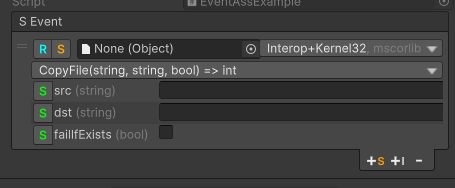
Here, +s to add a static callback, +i for an instance's callback, - to remove a callback.
R is a switch to change to Off, Editor & Runtime or Runtime Only, which is the same as UnityEvent.
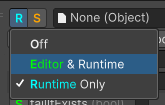
S is a switch to change mode between "static callback" and "instance callback".
Then, the object picker is to decide which type you want to limit:
- For static callback, it'll use the object's type you pick here. use
Noneif your target is not any Unity Object (e.g. just a helper class) - For instance callback, it'll use the object as the instance
The next dropdown is depending on the mode:
-
For static mode with no target, you need to select a type
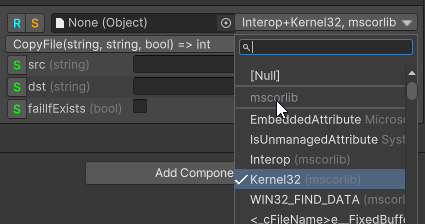
-
For static mode with target, or instance mode, you need to select a component on that target
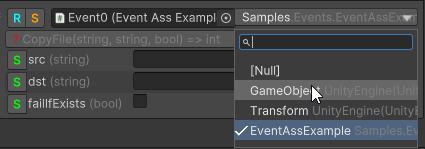
The dropdown below is where you pick your actual callback:
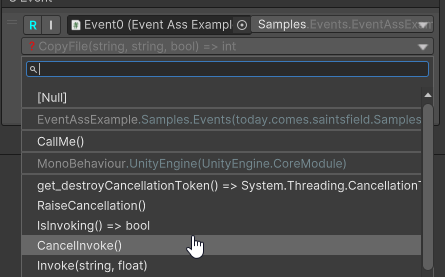
Finally, if your function has parameters, you need to check how each parameter is processed. Lets using another example:
using SaintsField.Events;

public class MyClass
{
    public int N;
    public override string ToString()
    {
        return quot;<MyClass N={N}/>";
    }
}

public SaintsEvent<MyClass, int, string> withName;

public void Callback(MyClass d, string s, int i = -1)
{
    Debug.Log(quot;Callback: i={i}, s={s}, d={d}");
}
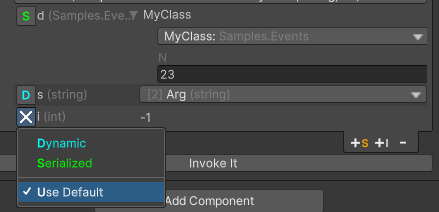
In the picture
Sis serialized, which allows you to pick a subclass (if any) and fill public fields.Dis dynamic, which allows you to bind its value to the event's value. In this example, it's binded toT2 (string)inSaintsEvent<MyClass, int, string>Xis default, which uses function parameter's default value. In this example,int i = -1, so use-1
Runtime
In runtime, you can use SaintsEvent.Invoke(), SaintsEvent.AddListener(callback) and SaintsEvent.RemoveListener(callback), SaintsEvent.RemoveAllListeners() just like UnityEvent.
Config
For a better naming, use SaintsEventArgs to rename the event generic parameters.
using SaintsField.Events;

[SaintsEventArgs("Custom", "Number", "Text")]
public SaintsEvent<MyClass, int, string> withName;
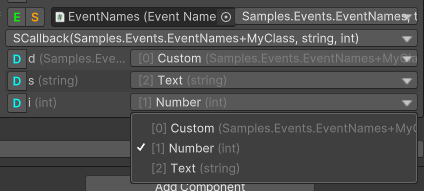
For static mode, you can also use TypeReference to filter the types you want.
using SaintsField;
using SaintsField.Events;

[TypeReference(onlyAssemblies: new []{"mscorlib"})]  // we only want types from mscorlib
public SaintsEvent sEvent;

[TypeReference(EType.CurrentOnly)]  // we only want types from current assembly
public SaintsEvent sEvent2;