FindObjectsByType/GetInSceneAutomatically assign a component to a field, if the field value is null and the component is in the currently opened scene. (First one found will be used)
(Old Name: GetComponentInScene)
-
(Optional)
EXP config: config. SeeSaints XPath-like Syntaxsection for more information.Note: You can change the default behavior of these attributes using
Window/Saints/Create or Edit SaintsField Config -
Type type = nullThe component type to assign. If null, it'll use the field type.
-
bool findObjectsInactive = falseShould inactive GameObject be included?
trueto include inactive GameObject. -
string groupBy = ""For error message grouping.
-
Allow Multiple: Yes
[GetInScene(bool includeInactive = true, Type compType = null, string groupBy = "")] is an alias of FindObjectsByType(null, true)
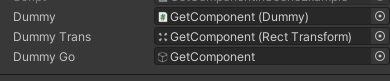
using SaintsField; [GetComponentInScene] public Dummy dummy; // by setting compType, you can assign it as a different type [GetComponentInScene(compType: typeof(Dummy))] public RectTransform dummyTrans; // and GameObject field works too [GetComponentInScene(compType: typeof(Dummy))] public GameObject dummyGo;