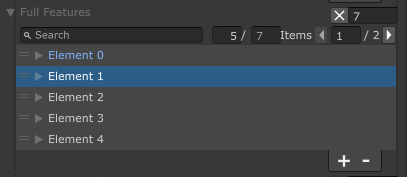
ListDrawerSettingsImportantEnableSaintsEditorbefore using
Allow you to search and paging a large list/array.
Parameters:
bool searchable = false: allow search in the list/arrayint numberOfItemsPerPage = 0: how many items per page by default.<=0means no pagingstring extraSearch = null: set a callback function to use your custom search. If not match, use the default search.
Note about input:
- When input anything, it'll wait for 0.6 seconds for next input, then perform the actual searching
- You can always use
Enterto search immediately
// Please ensure you already have SaintsEditor enabled in your project before trying this example using SaintsField.Playa; [Serializable] public struct MyData { public int myInt; public string myString; public GameObject myGameObject; public string[] myStrings; } [ListDrawerSettings(searchable: true, numberOfItemsPerPage: 3)] public MyData[] myDataArr;
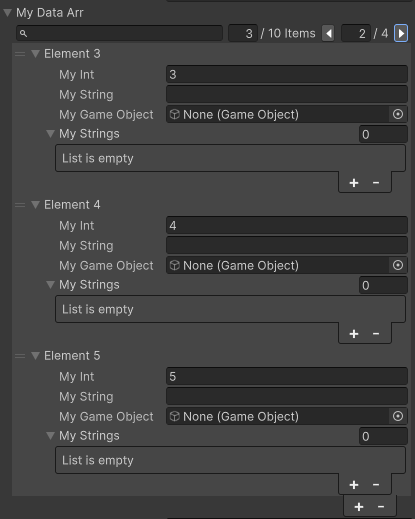
The first input is where you can search. The next input can adjust how many items per page. The last part is the paging.
Async Search
In UI Toolkit you can also see the async searching which does not block the editor when searching in a BIG list:
Custom Search
extraSearch uses the following signiture:
bool CustomSearch(T item, int index, IReadOnlyList<SaintsField.Playa.ListSearchToken> searchToken)bool CustomSearch(T item, IReadOnlyList<SaintsField.Playa.ListSearchToken> searchToken)bool CustomSearch(int index, IReadOnlyList<SaintsField.Playa.ListSearchToken> searchToken)
ListSearchToken is a struct of:
public readonly struct ListSearchToken
{
    public readonly ListSearchType Type;  // filter type: Include, Exclude
    public readonly string Token;  // search string
}
example:
[Serializable]
public enum WeaponType
{
    Sword,
    Arch,
    Hammer,
}

[Serializable]
public struct Weapon
{
    public WeaponType weaponType;
    public string description;
}

private bool ExtraSearch(Weapon weapon, int _, IReadOnlyList<ListSearchToken> tokens)
{
    string searchName = new Dictionary<WeaponType, string>
    {
        { WeaponType.Arch , "弓箭 双手" },
        { WeaponType.Sword , "刀剑 单手" },
        { WeaponType.Hammer, "大锤 双手" },
    }[weapon.weaponType];
    return RuntimeUtil.SimpleSearch(searchName, tokens);
}

[ListDrawerSettings(extraSearch: nameof(ExtraSearch))]
public Weapon[] weapons;
You can now search as you want, both your custom search & serialized property search:
ShowInInspector is supported with this attribute.
[ShowInInspector, ListDrawerSettings(numberOfItemsPerPage: 5)]
private List<MyStruct> FullFeatures = new List<MyStruct>{ /*...*/ };