TableImportantEnableSaintsEditorbefore using
Show a list/array of class/struct/ScriptableObject(or MonoBehavior if you like) as a table.
It allows to resize the rows, hide rows.
UI Toolkit: Button, ShowInInspector & Playa* will work as expected, and Layout will be ignored.
Parameters:
bool hideAddButton=false: Should the add button be hidden?bool hideRemoveButton=false: Shoule the remove button be hidden?bool defaultCollapse=false: Should all the rows be collapsed by default?bool searchable=false: allow to search the whole table and each columnsint numberOfItemsPerPage=0: allow pagingstring extraSearch=null: a callback to set extra searchingbool searchableAll=false: allow to search the whole tablebool searchableCols=true: allow to search each columns
extraSearch callback signatures:
bool ExtraSearch(T item, IReadOnlyList<ListSearchToken> tokens); bool ExtraSearch(int index, IReadOnlyList<ListSearchToken> tokens); bool ExtraSearch(T item, int index, IReadOnlyList<ListSearchToken> tokens);
Example:
using SaintsField;

[Table]
public Scriptable[] scriptableArray;

[Serializable]
public struct MyStruct
{
    public int myInt;
    public string myString;
    public GameObject myObject;
}

[Table]
public MyStruct[] myStructs;
You can use foldout on beginning of each row to fold/expand the row. Or use menu on top right to toggle all
TableColumn
TableColumn allows you to merge multiple fields into one column.
[Serializable]
public struct MyStruct
{
    public int myInt;

    [TableColumn("Value"), AboveRichLabel]
    public string myString;
    [TableColumn("Value"), AboveRichLabel]
    public GameObject myObject;
}

[Table]
public List<MyStruct> myStructs;
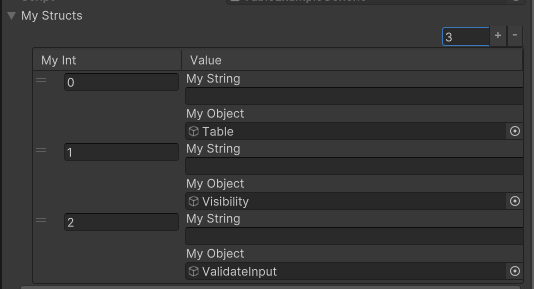
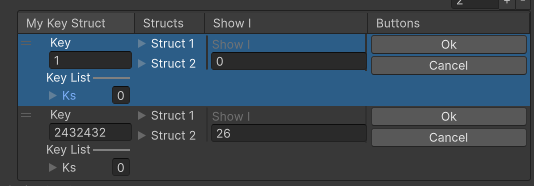
You can also use Button, ShowInInspector etc.:
using SaintsField;
using SaintsField.Playa;

[Serializable]
public struct MyValueStruct
{
    // ...

    [TableColumn("Buttons")]
    [Button("Ok")]
    public void BtnOk() {}

    [TableColumn("Buttons")]
    [Button("Cancel")]
    public void BtnCancel() {}

    [ShowInInspector] private int _showI;
}

[Table, DefaultExpand]
public MyValueStruct[] myStructs;
TableHide
You can use TableHide attribute to exclude some column from the table. It'll hide the column by default, and you can still toggle it in header - right click menu
[Serializable]
public struct MyStruct
{
    // Hide a single row
    [TableHide] public int hideMeInTable;

    // Hide a grouped column
    [TableColumn("HideGroup"), TableHide]
    public int hideMeGroup1;

    [TableColumn("HideGroup")]
    [ShowInInspector] private const int HideMeGroup2 = 2;

}

[Table]
public List<MyStruct> myStructs;
TableHeaders/TableHeadersHide
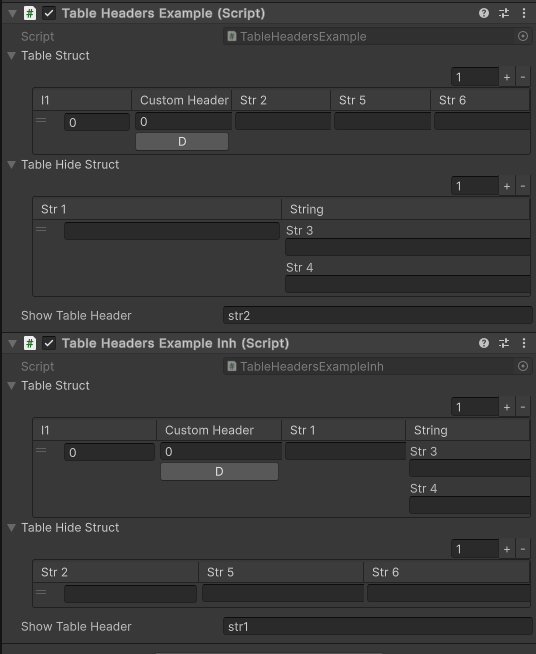
You can use TableHeaders to default show some columns for the table, or TableHeadersHide to hide them.
Note: this does not remove the header, but hide it by default. You can still toggle it in header - right click menu.
Thus, it'll only affect the appearance when the table is rendered, and will NOT dynamicly update it, unless you select away and back, as it will trigger the re-paint process.
Parameters:
-
string headers...: the headers to show/hide.If it starts with
$, a callback/property/field value is used. The target must return a string, orIEnumerable<string>
using SaintsField;

[Serializable]
public struct TableHeaderStruct
{
    public int i1;

    [TableColumn("Custom Header")] public int i2;
    [TableColumn("Custom Header")] [Button] private void D() {}

    public string str1;
    public string str2;

    [TableColumn("String")] public string str3;
    [TableColumn("String")] public string str4;

    public string str5;
    public string str6;
}

[Table]
[TableHeaders(  // what should be shown by default
    nameof(TableHeaderStruct.i1),  // directly name
    "Custom Header",  // directly custom name
    "quot; + nameof(showTableHeader),  // callback of a single name
    "quot; + nameof(ShowTableHeaders))  // callback of mutiple names
]
public TableHeaderStruct[] tableStruct;

[Table]
[TableHeadersHide(  // what should be hidden by default
        nameof(TableHeaderStruct.i1),  // directly name
        "Custom Header",  // directly custom name
        "quot; + nameof(showTableHeader),  // callback of a single name
        "quot; + nameof(ShowTableHeaders))  // callback of mutiple names
]
public TableHeaderStruct[] tableHideStruct;

[Space]
public string showTableHeader = nameof(TableHeaderStruct.str2);

protected virtual IEnumerable<string> ShowTableHeaders() => new[]
{
    nameof(TableHeaderStruct.str5),
    nameof(TableHeaderStruct.str6),
};
Then you can inherent or change field to make the table display differently
public class TableHeadersExampleInh : TableHeadersExample
{
    protected override IEnumerable<string> ShowTableHeaders() => new[]
    {
        "String",
    };
}
Results:
You can set paging or manually toggle it in config button
[Table(numberOfItemsPerPage: 5)] public MyStruct[] numbers;
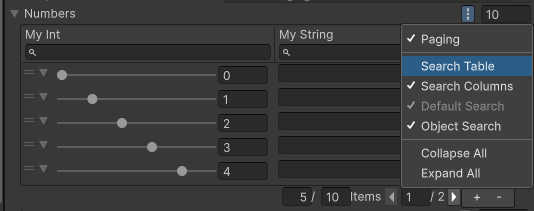
Table works with ShowInInspector and Button
[ShowInInspector, Table(numberOfItemsPerPage: 3)]
private MyStruct[] ShowNumbers;

[Button, Table]  // display returned value as table
private MyStruct[] LogNumbers([Table(searchable: true, numberOfItemsPerPage: 3)] MyStruct[] rows)  // use table to fill the param
{
    Debug.Log(rows == null ? "No rows" : quot;Rows: {rows.Length}");
    return rows;
}