ShaderParamSelect a shader parameter from a shader, material or renderer. (Requires Unity 2021.2+)
It supports string/ShaderParam fields and saves the shader parameter.
Parameters:
- [Optional]
string name: the target. Be a property or a callback that returns ashader,materialorrenderer. When omitted, it will try to get theRenderercomponent from the current component. - [Optional]
ShaderPropertyType propertyType: filter the shader parameters by type. Omitted to show all types. - [Optional]
int index=0: which material index to use when the target is aRenderer.
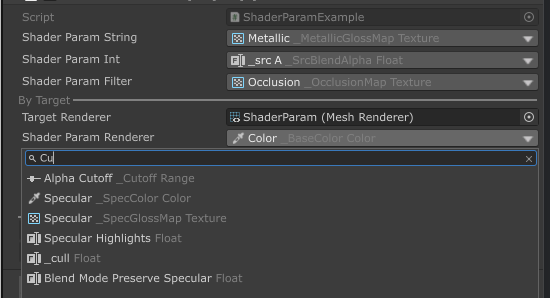
[ShaderParam] public string shaderParamString; [ShaderParam(0)] public string shaderParamAtIndex; [ShaderParam(ShaderPropertyType.Texture)] public string shaderParamFilter; [Separator("By Target")] [GetComponent] public Renderer targetRenderer; [ShaderParam(nameof(targetRenderer))] public string shaderParamRenderer; private Material GetMat() => targetRenderer.sharedMaterial; [ShaderParam(nameof(GetMat))] public string shaderParamMat; private Shader GetShader() => targetRenderer.sharedMaterial.shader; [ShaderParam(nameof(GetShader))] public string shaderParamShader;
It's recommended to use ShaderParam type because it can auto convert to hash id, which is much faster than using string.
public ShaderParam shaderParamType;
// attribute is also supported
[ShaderParam(ShaderPropertyType.Float)] public ShaderParam shaderParamTypeWithFilter;

private void Awake()
{
    // directly put into `Set*()` in material, it'll convert & cache the hash id
    material.SetFloat(shaderParamTypeWithFilter, 2f);
}
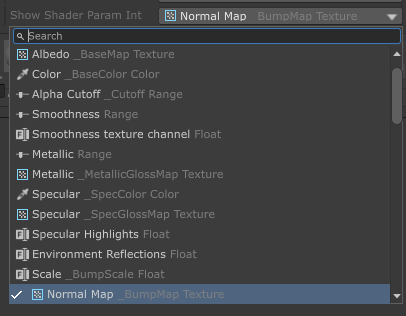
It works with ShowInInspector
[ShowInInspector, ShaderParam]
public string ShowShaderParamString
{
    get => shaderParamString;
    set => shaderParamString = value;
}
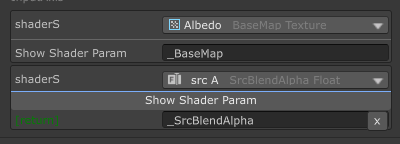
It works with ShowInInspector/Button parameters and return value
[ShowInInspector]
private string ShowShaderParam([ShaderParam] string shaderS) => shaderS;

[Button]
private string ShowShaderParam([ShaderParam] string shaderS) => shaderS;