CompInfoBoxImportantEnableSaintsEditorbefore using
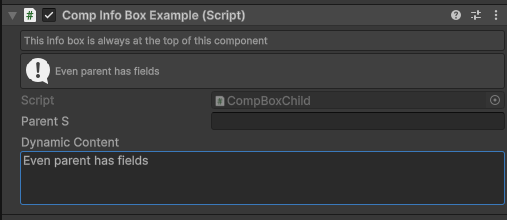
Draw an info box at the top of a component inspector, before the Script field.
This uses the same rich text and callback behavior as InfoBox, but is intended for component-level messages that should always stay at the top of the component inspector.
Parameters:
-
string contentThe content of the info box.
If it starts with
$, the leading$will be removed andisCallbackwill be set totrue. Use\$to escape the starting$. -
EMessageType messageType=EMessageType.InfoMessage icon. Options are
NoneInfoWarningError
-
string show=nulla callback name or property name for show or hide this info box.
using SaintsField; [CompInfoBox("This info box is always at the top of this component", EMessageType.None)] [CompInfoBox("quot; + nameof(dynamicContent))] public class CompInfoBoxExample : MonoBehaviour { [ResizableTextArea] public string dynamicContent; }