FieldSeparator / FieldBelowSeparatorTipOnly use this if you can not enableSaintsEditor
Draw text, separator, spaces for field on above / below with rich text & dynamic text support. Using on an array will apply to every element (instead of the array/list itself).
Parameters:
-
string title=nulldisplay a title.nullfor no title, only separator.If it starts with
$, the leading$will be removed andisCallbackwill be set totrue. Use\$to escape the starting$. -
EColor color=EColor.Graycolor for the title and the separator -
EAlign eAlign=EAlign.Starthow the title is positioned, options are:EAlign.StartEAlign.CenterEAlign.End
-
bool isCallback=falsewhentrue, usetitleas a callback to get a dynamic title -
int space=0leave some space above or below the separator, like whatSpacedoes. -
bool below=falsewhentrue, draw the separator below the field.
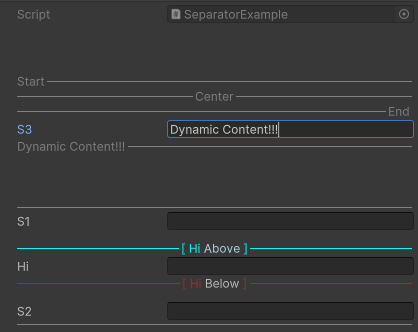
using SaintsField; [Space(50)] [FieldSeparator("Start")] [FieldSeparator("Center", EAlign.Center)] [FieldSeparator("End", EAlign.End)] [FieldBelowSeparator("quot; + nameof(Callback))] public string s3; public string Callback() => s3; [Space(50)] [FieldSeparator] public string s1; [FieldSeparator(10)] // this behaves like a space [FieldSeparator("[ Hi <color=LightBlue>Above</color> ]", EColor.Aqua, EAlign.Center)] [FieldBelowSeparator("[ Hi <color=Silver>Below</color> ]", EColor.Brown, EAlign.Center)] [FieldBelowSeparator(10)] public string hi; [FieldBelowSeparator] public string s2;
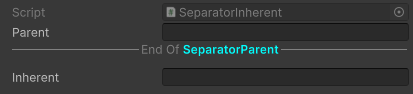
This is very useful when you what to separate parent fields from the inherent:
using SaintsField;

public class SeparatorParent : MonoBehaviour
{
    [BelowSeparator("End Of <b><color=Aqua><container.Type/></color></b>", EAlign.Center, space: 10)]
    public string parent;
}

public class SeparatorInherent : SeparatorParent
{
    public string inherent;
}