LabelTextImportantEnableSaintsEditorbefore using
Change the label text of a field. (To change element label of an array/list, use FieldLabelText instead.)
Parameters:
-
string richTextXmlthe rich text xml for the label. Supported tag:- All Unity rich label tag, like
<color=#ff0000>red</color> <icon=path/to/image.png />for icon<label />for current field name<field />,<field.subField/>,<field.subField=formatControl />read the value from the field first, if tag has sub-field, continue to read, then usestring.Formatif there is aformatControl. See the example below.<container.Type />for the class/struct name of the container of the field<container.Type.BaseType />for the class/struct name of the field's container's parent<index />,<index=formatControl />for the index if the target is an array/list
Note about format control:
- If the format contains
{}, it will be used like astring.Format. E.g.<field.subField=(--<color=red>{0}</color>--)/>will be interpreted likestring.Format("(--<color=red>{0}</color>--)", this.subField). - Otherwise, it will be rewritten to
{0:formatControl}. E.g.,<index=D4/>will be interpreted likestring.Format("{0:D4}", index).
nullmeans no labelfor
icon, it will search the following path:"Assets/Editor Default Resources/SaintsField/"(You can override things here)"Assets/SaintsField/Editor/Editor Default Resources/SaintsField/"(this is most likely to be when installed usingunitypackage)"Packages/today.comes.saintsfield/Editor/Editor Default Resources/SaintsField/"(this is most likely to be when installed usingupm)Assets/Editor Default Resources/, then fallback to built-in editor resources by name (usingEditorGUIUtility.Load)
You can also use Unity Editor's built-in icons. See UnityEditorIcons. e.g.
<icon=d_AudioListener Icon/>for
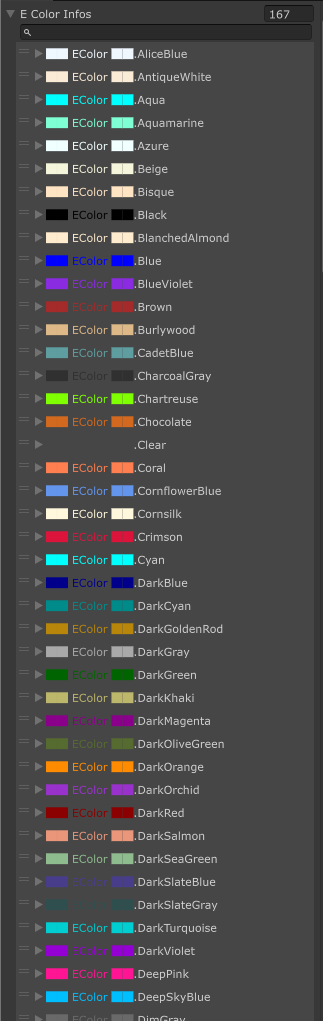
color, you can useTools-Saints Field-EColor Previewto view all the pre-set colors. It supports:-
Standard Unity Rich Label colors:
aqua,black,blue,brown,cyan,darkblue,fuchsia,green,gray,grey,lightblue,lime,magenta,maroon,navy,olive,orange,purple,red,silver,teal,white,yellow -
Standard Unity Pre-Set Color Presets (Unity 6.2 as a reference), e.g.
darkViolet,hotPink -
Some extra colors from NaughtyAttributes & UI Toolkit:
clear,pink,indigo,violet,charcoalGray,oceanicSlate -
html color which is supported by
ColorUtility.TryParseHtmlString, like#RRGGBB,#RRGGBBAA,#RGB,#RGBA
If it starts with
$, the leading$will be removed andisCallbackwill be set totrue. Use\$to escape the starting$. - All Unity rich label tag, like
-
bool isCallback=false(Depreacted, use$with "richTextXml" instead)if it's a callback (a method/property/field)
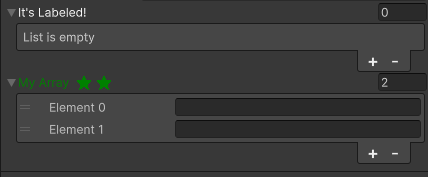
// Please ensure you already have SaintsEditor enabled in your project before trying this example using SaintsField.Playa; [LabelText("<color=lime>It's Labeled!")] public List<string> myList; [LabelText("quot; + nameof(MethodLabel))] public string[] myArray; private string MethodLabel(string[] values) { return quot;<color=green><label /> {string.Join("", values.Select(_ => "<icon=star.png />"))}"; }
Example of using <field /> to display field value/propery value:
using SaintsField;

public class SubField : MonoBehaviour
{
    [SerializeField] private string _subLabel;

    public double doubleVal;
}

[Separator("Field")]
// read field value
[LabelText("<color=lime><field/>")] public string fieldLabel;
// read the `_subLabel` field/function from the field
[LabelText("<field._subLabel/>"), GetComponentInChildren, Expandable] public SubField subField;
// again read the property
[LabelText("<color=lime><field.gameObject.name/>")] public SubField subFieldName;

[Separator("Field Null")]
// not found target will be rendered as empty string
[LabelText("<field._subLabel/>")] public SubField notFoundField;
[LabelText("<field._noSuch/>"), GetComponentInChildren] public SubField notFoundField2;

[Separator("Formatter")]
// format as percent
[LabelText("<field=P2/>"), PropRange(0f, 1f)] public float percent;
// format `doubleVal` field as exponential
[LabelText("<field.doubleVal=E/>")] public SubField subFieldCurrency;
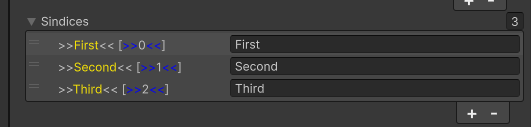
Example of quoted fancy formatting:
[LabelText("<field=\">><color=yellow>{0}</color><<\"/> <index=\"[<color=blue>>></color>{0}<color=blue><<</color>]\"/>")]
public string[] sindices;