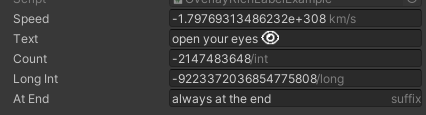
OverlayTextLike TextLabel, but it's rendered on top of the field.
Only supports string/number type of field. Does not work with any kind of TextArea (multiple line) and Range.
Using on an array/list will apply to every element (instead of the array/list itself).
Parameters:
-
string richTextXmlthe content of the label, or a property/callback. Supports tags likeLabelTextIf it starts with
$, the leading$will be removed andisCallbackwill be set totrue. Use\$to escape the starting$. -
bool isCallback=falseif true, therichTextXmlwill be interpreted as a property/callback function, and the string value / the returned string value (tag supported) will be used as the label content -
float padding=5fpadding between your input and the label. Not work whenend=true -
bool end=falsewhen false, the label will follow the end of your input. Otherwise, it will stay at the end of the field. -
string GroupBy=""this is only for the error message box. -
Allow Multiple: No
using SaintsField; [OverlayText("<color=grey>km/s")] public double speed = double.MinValue; [OverlayText("<icon=eye.png/>")] public string text; [OverlayText("<color=grey>/int", padding: 1)] public int count = int.MinValue; [OverlayText("<color=grey>/long", padding: 1)] public long longInt = long.MinValue; [OverlayText("<color=grey>suffix", end: true)] public string atEnd;