AboveImage/BelowImageShow an image above/below the field.
-
string image = nullAn image to display. This can be a property or a callback, which returns a
Sprite,Texture2D,SpriteRenderer,UI.Image,UI.RawImage,UI.Button, or AddressableAssetReferencetype.If it's null, it'll try to get the image from the field itself.
You can use path to specify a hierarchy target. See the example below.
-
string maxWidth=-1preview max width, -1 for original image size. If it's greater than current view width, it'll be scaled down to fit the view. . Use
int.MaxValueto always fit the view width. -
int maxHeight=-1preview max height, -1 for auto resize (with the same aspect) using the width
-
EAlign align=EAlign.StartAlign of the preview image. Options are
Start,End,Center,FieldStart -
string groupBy=""See the
GroupBysection -
AllowMultiple: No
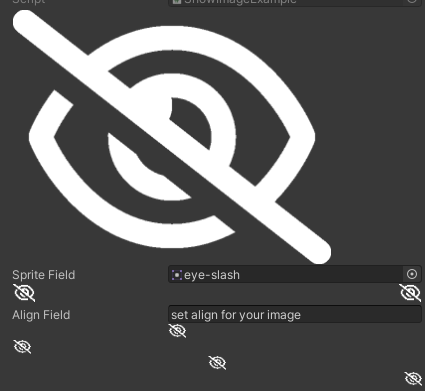
using SaintsField; [AboveImage(nameof(spriteField))] // size and group [BelowImage(nameof(spriteField), maxWidth: 25, groupBy: "Below1")] [BelowImage(nameof(spriteField), maxHeight: 20, align: EAlign.End, groupBy: "Below1")] public Sprite spriteField; // align [BelowImage(nameof(spriteField), maxWidth: 20, align: EAlign.FieldStart)] [BelowImage(nameof(spriteField), maxWidth: 20, align: EAlign.Start)] [BelowImage(nameof(spriteField), maxWidth: 20, align: EAlign.Center)] [BelowImage(nameof(spriteField), maxWidth: 20, align: EAlign.End)] public string alignField;
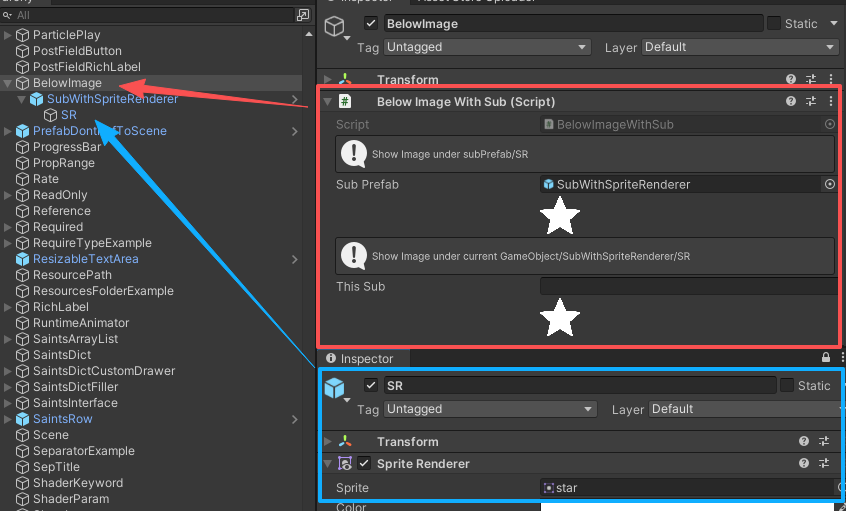
You can use ./Path/Of/Current/Field (starts with ./) to find a target from current field's hierarchy. This is useful when you want to show an image inside a prefab.
Using /Path/Of/Current/Target (starts with /) to find a target from current target's hierarchy
// field object, then find the target in hierarchy
[InfoBox("Show Image under subPrefab/SR")]
[BelowImage("./SR", maxWidth: 40)] public GameObject subPrefab;

// find the target in current object's hierarchy
[InfoBox("Show Image under current GameObject/SubWithSpriteRenderer/SR")]
[BelowImage("/SubWithSpriteRenderer/SR", maxWidth: 40)] public string thisSub;