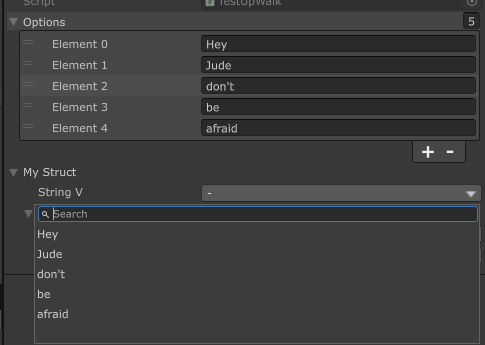
AdvancedDropdownA dropdown selector. Supports reference type, sub-menu, separator, search, and disabled select item, plus icon.
Known Issue:
-
IMGUI: Using Unity's
AdvancedDropdown. Unity'sAdvancedDropdownallows to click the disabled item and close the popup, thus you can still click the disable item. This is a BUG from Unity. I managed to "hack" it around to show again the popup when you click the disabled item, but you will see the flick of the popup.This issue is not fixable unless Unity fixes it.
This bug only exists in IMGUI
-
UI Toolkit:
The group indicator uses
ToolbarBreadcrumbs. Sometimes you can see text get wrapped into lines. This is because Unity's UI Toolkit has some layout issue, that it can not have the same layout even with same elements+style+boundary size.This issue is not fixable unless Unity fixes it. This issue might be different on different Unity (UI Toolkit) version.
Arguments
string funcName=nullcallback function. Must return either aDropdown<T>or aIEnumerable<object>(list/array etc.). When using on anenum, you can omit this parameter, and the dropdown will use the enum values as the dropdown items. When omitted, it will try to find all the static values from the field type. You can use../to get upward callback/property for a callbackEUnique unique=EUnique.None: When using on a list/array, a duplicated option can be removed ifEnique.Remove, or disabled ifEUnique.Disable. No use for non-list/array.- AllowMultiple: No
Dropdown<T>
-
string displayNameitem name to display -
T valueorIEnumerable<Dropdown<T>> children: value means it's a value item. Otherwise, it's a group of items, which the values are specified bychildren -
bool disabled = falseif item is disabled -
string icon = nullthe icon for the item.Note: setting an icon for a parent group will result a weird issue on its subpage's title and block the items. This is not fixable unless Unity decide to fix it.
-
bool isSeparator = falseif item is a separator. You should not use this, butDropdown<T>.Separator()instead
using SaintsField; [AdvancedDropdown(nameof(AdvDropdown)), BelowText(nameof(drops), true)] public int drops; public Dropdown<int> AdvDropdown() { return new Dropdown<int>("Days") { // a grouped value new Dropdown<int>("First Half") { // with icon new Dropdown<int>("Monday", 1, icon: "eye.png"), // no icon new Dropdown<int>("Tuesday", 2), }, new Dropdown<int>("Second Half") { new Dropdown<int>("Wednesday") { new Dropdown<int>("Morning", 3, icon: "eye.png"), new Dropdown<int>("Afternoon", 8), }, new Dropdown<int>("Thursday", 4, true, icon: "eye.png"), }, // direct value new Dropdown<int>("Friday", 5, true), Dropdown<int>.Separator(), new Dropdown<int>("Saturday", 6, icon: "eye.png"), new Dropdown<int>("Sunday", 7, icon: "eye.png"), }; }
IMGUI
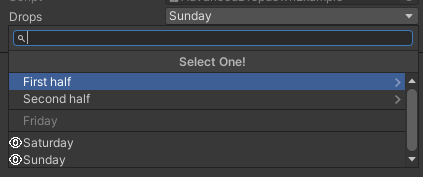
UI Toolkit
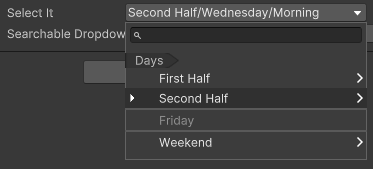
There is also a parser to automatically separate items as sub items using /:
using SaintsField;

[AdvancedDropdown(nameof(AdvDropdown))] public int selectIt;

public Dropdown<int> AdvDropdown()
{
    return new Dropdown<int>("Days")
    {
        {"First Half/Monday", 1, false, "star.png"},  // enabled, with icon
        {"First Half/Tuesday", 2},

        {"Second Half/Wednesday/Morning", 3, false, "star.png"},
        {"Second Half/Wednesday/Afternoon", 4},
        {"Second Half/Thursday", 5, true, "star.png"},  // disabled, with icon
        "",  // root separator
        {"Friday", 6, true},  // disabled
        "",
        {"Weekend/Saturday", 7, false, "star.png"},
        "Weekend/",  // separator under `Weekend` group
        {"Weekend/Sunday", 8, false, "star.png"},
    };
}
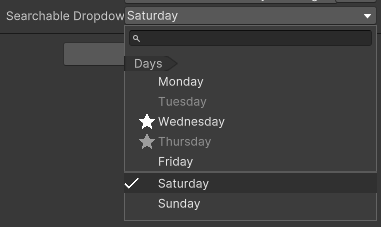
You can use this to make a searchable dropdown:
using SaintsField;

[AdvancedDropdown(nameof(AdvDropdownNoNest))] public int searchableDropdown;

public Dropdown<int> AdvDropdownNoNest()
{
    return new Dropdown<int>("Days")
    {
        {"Monday", 1},
        {"Tuesday", 2, true},  // disabled
        {"Wednesday", 3, false, "star.png"},  // enabled with icon
        {"Thursday", 4, true, "star.png"},  // disabled with icon
        {"Friday", 5},
        "",  // separator
        {"Saturday", 6},
        {"Sunday", 7},
    };
}
Example of returning an array/list:
// field:
[AdvancedDropdown(nameof(childTrans))] public Transform selected;
[GetComponentInChildren] public Transform[] childTrans;

// or a callback of IEnumerable:
[AdvancedDropdown(nameof(ChildTrans))] public Transform selectedCallback;
private IEnumerable<Transform> ChildTrans() => transform.Cast<Transform>();
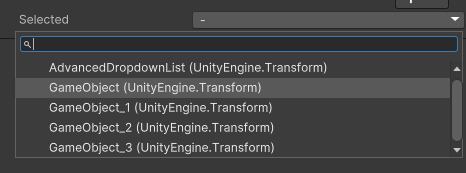
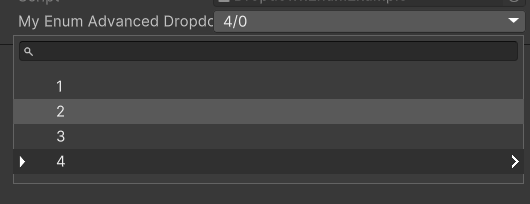
Finally, using it on an enum to select one enum without needing to specify the callback function.
If you add RichLabel to the enum, the item name will be changed to the RichLabel content.
[Serializable]
public enum MyEnum
{
    [InspectorName("1")]  // RichLabel is optional. Just for you to have more fancy control
    First,
    [InspectorName("2")]
    Second,
    [InspectorName("3")]
    Third,
    [InspectorName("4/0")]
    ForthZero,
    [InspectorName("4/1")]
    ForthOne,
}

[AdvancedDropdown] public MyEnum myEnumAdvancedDropdown;
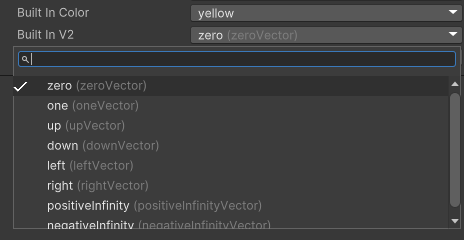
Also, using on a type like Color to pick a pre-defined static value:
[AdvancedDropdown] public Color builtInColor;
[AdvancedDropdown] public Vector2 builtInV2;
[AdvancedDropdown] public Vector3Int builtInV3Int;
Example of up-walk
[Serializable]
public struct Down
{
    [AdvancedDropdown("../../" + nameof(options))]  // Up walk 2 levels
    public string stringV;
}

[Serializable]
public struct MyStruct
{
    [AdvancedDropdown("../" + nameof(options))]  // Up walk 1 level
    public string stringV;
    public Down down;
}

public List<string> options;

public MyStruct myStruct;