AssetPreviewShow an image preview for prefabs, Sprite, Texture2D, Addressable AssetReference, etc. (Internally use AssetPreview.GetAssetPreview), or on type.
Note: Recommended to use AboveImage/BelowImage for image/sprite/texture2D.
-
int width=-1preview width, -1 for original image size that returned by Unity. If it's greater than current view width, it'll be scaled down to fit the view. Use
int.MaxValueto always fit the view width. -
int height=-1preview height, -1 for auto resize (with the same aspect) using the width
-
EAlign align=EAlign.FieldStartAlign of the preview image. Options are
Start,End,Center,FieldStart -
bool above=falseif true, render above the field instead of below
-
string groupBy=""See the
GroupBysection -
Allow Multiple: No
using SaintsField; [AssetPreview(20, 100)] public Texture2D _texture2D; [AssetPreview(50)] public GameObject _go; [AssetPreview(above: true)] public Sprite _sprite;
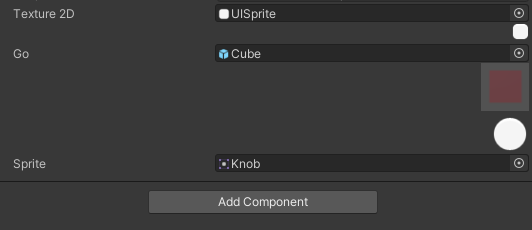
If the target is a 3D model, materal etc, the previwe panel is interactive
using SaintsField;

[AssetPreview] public GameObject prefabWithModel;
[AssetPreview] public GameObject fbx;
[AssetPreview] public Material drawMaterial;