CustomContextMenuImportantEnableSaintsEditorbefore using
Add a context menu (right click) item for a target
Parameters:
-
string funcName null: which function should it call when selected. Ifnull, add an seperator instead. -
string menuName = null: menu item name.If
null, use "funcName" as name.If starts with
$, use a callback instead. Callback can must be one of:string MyMenuName(MyFieldType fieldValue); string MyMenuName(); (string menuName, EContextMenuStatus menuStatus) MyMenuName(MyFieldType fieldValue); (string menuName, EContextMenuStatus menuStatus) MyMenuName();
EContextMenuStatus can be:
NormalCheckedDisabled
Allow Multiple: Yes
Simple Example:
using SaintsField;

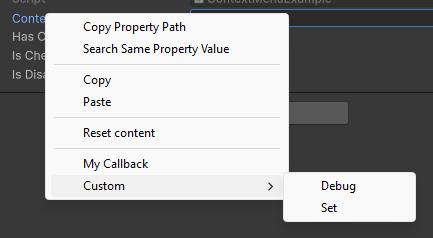
[CustomContextMenu(nameof(MyCallback))]  // use default name
[CustomContextMenu(nameof(Func1), "Custom/Debug")]  // use sub item
[CustomContextMenu(nameof(Func2), "Custom/Set")]  // use sub item
public string content;

private void MyCallback()
{
    Debug.Log("clicked on MyCallback");
}
private void Func1(string c)  // you can accept the current field's value
{
    Debug.Log(c);
}
private void Func2()
{
    content = "Hi There";
}
Dynamic item control:
using SaintsField;

[CustomContextMenu(":Debug.Log", "quot; + nameof(DynamicMenuCallback))]  // use `:` for static method calling
[CustomContextMenu(nameof(DynamicMenuInfoClick), "quot; + nameof(DynamicMenuInfo))]
public string content;

public string DynamicMenuCallback()  // dynamic control the item name;
{
    return quot;Random {Random.Range(0, 9)}";
}

public bool hasContextMenu;
public bool isChecked;
public bool isDisabled;

private void DynamicMenuInfoClick()
{
    isChecked = !isChecked;
}

public (string menuName, EContextMenuStatus menuStatus) DynamicMenuInfo()  // control it's label & status
{
    if (!hasContextMenu)
    {
        return (null, default);
    }
    EContextMenuStatus status = EContextMenuStatus.Normal;
    if (isChecked)
    {
        status = EContextMenuStatus.Checked;
    }
    else if (isDisabled)
    {
        status = EContextMenuStatus.Disabled;
    }
    return (quot;My Menu {status}", status);
}
IEnumerator callback is supported:
using SaintsField;

[CustomContextMenu(nameof(MyGenerator))] // use default name
public int myInt;

private IEnumerator MyGenerator()
{
    for (int i = 0; i < 100; i++)
    {
        Debug.Log(i);
        myInt = i;
        yield return null;
    }
}
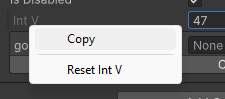
This attribute works with ShowInInspector
using SaintsField;

[CustomContextMenu("quot; + nameof(ResetIntV))]
[ShowInInspector] private int _intV;

private void ResetIntV()
{
    _intV = 0;
}
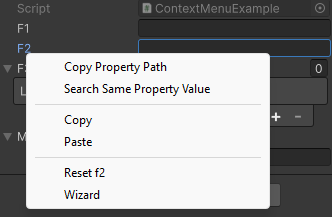
Using on a function, it'll add context to the whole component target inspector
using SaintsField;

[CustomContextMenu]  // The whole component will have this context menu
private void Wizard()
{
}
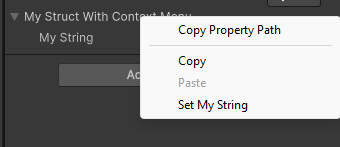
Using on a function of a general struct/class, it'll add context to the drawer of this struct/class
using SaintsField;

[Serializable]
public struct MyStruct
{
    public string myString;

    [CustomContextMenu("Set My String")]  // The whole `MyStruct` type will have this context menu
    public void SetString()
    {
        myString = "My Struct Value";
    }
}

public MyStruct myStructWithContextMenu;