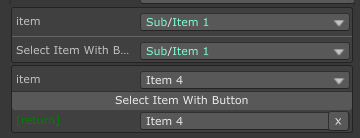
DropdownA tree dropdown selector. Supports reference type, sub-menu, separator, search, and disabled select item, plus icon.
This is the recommended way to make a searchable dropdown.
Arguments
-
string funcName=nullcallback function. Must return aDropdown<T>, aIEnumerable<object>(list/array etc.), aTask<Dropdown<T>>, aUniTask<Dropdown<T>>, or aIEnumeratorthat yieldDropdown<T>at last. When using on anenum, you can omit this parameter, and the dropdown will use the enum values as the dropdown items. When omitted, it will try to find all the static values from the field type. You can use../to get upward callback/property for a callback.When returning a task/ienumerator type, it'll wait the task then show the dropdown. Useful if your option targets needs time to load.
-
EUnique unique=EUnique.None: When using on a list/array, a duplicated option can be removed ifEnique.Remove, or disabled ifEUnique.Disable. No use for non-list/array. -
bool slashAsSub = true: should it tread/as path seperator in dropdown? This is helpful if you have SaintsField enabled, and hasenumdefined withInspectorName, but the/does not mean for grouping
Allow Multiple: No
It can make a quick searchable dropdown:
[Dropdown(nameof(BookDrop))] public string bookName; private IEnumerable<string> BookDrop() { return new[] { "Hackers & Painters, Vol 1", "Hackers & Painters, Vol 2", "The Art of Unix Programming, Vol 1", "The Art of Unix Programming, Vol 2", "The Mythical Man-Month, Vol 1", "The Mythical Man-Month, Vol 2", }; }
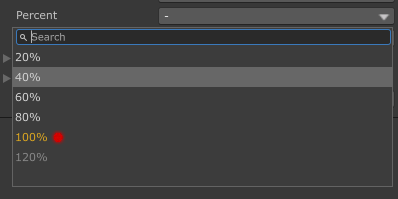
It can set labels for these items with rich text support
[Dropdown(nameof(QuickDrop))] public float percent;

private Dropdown<float> QuickDrop()
{
    Dropdown<float> result = new Dropdown<float>
    {
        { "20%", 0.2f },
        { "40%", 0.4f },
        { "60%", 0.6f },
    };
    // `Add` is supported
    result.Add("80%", 0.8f);
    // rich tag is supported
    result.Add(quot;<color={EColor.GoldenRod}>100%<icon=lightMeter/redLight/>", 1f);
    // disable is supported
    result.Add("120%", 1.2f, true);
    return result;
}
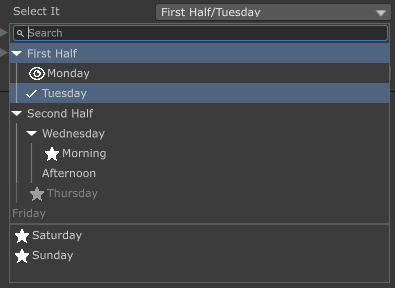
It supports nested items
using SaintsField;

[Dropdown(nameof(AdvDropdown))] public int drops;

public Dropdown<int> AdvDropdown()
{
    return new Dropdown<int>
    {
        // a grouped value
        new Dropdown<int>("First Half")
        {
            // with icon
            new Dropdown<int>("Monday", 1, icon: "eye.png"),
            // no icon
            new Dropdown<int>("Tuesday", 2),
        },
        new Dropdown<int>("Second Half")
        {
            new Dropdown<int>("Wednesday")
            {
                new Dropdown<int>("Morning", 3, icon: "star.png"),
                new Dropdown<int>("Afternoon", 8),
            },
            new Dropdown<int>("Thursday", 4, true, icon: "star.png"),
        },
        // direct value
        new Dropdown<int>("Friday", 5, true),
        Dropdown<int>.Separator(),
        new Dropdown<int>("Saturday", 6, icon: "star.png"),
        new Dropdown<int>("Sunday", 7, icon: "star.png"),
    };
}
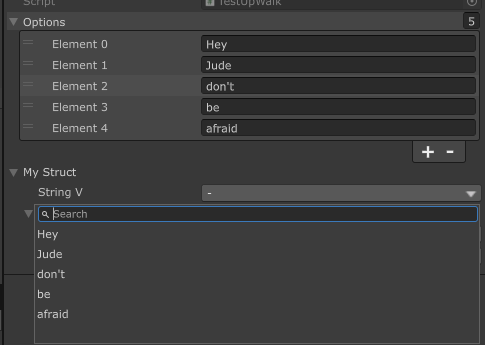
Example of up-walk
[Serializable]
public struct Down
{
    [Dropdown("../../" + nameof(options))]  // Up walk 2 levels
    public string stringV;
}

[Serializable]
public struct MyStruct
{
    [Dropdown("../" + nameof(options))]  // Up walk 1 level
    public string stringV;
    public Down down;
}

public List<string> options;

public MyStruct myStruct;
It supports async wait:
using SaintsField;

// Task support
[Dropdown(nameof(BookDrop))] public string bookName;

private async Task<Dropdown<string>> BookDrop()
{
    await Task.Delay(600);

    if (showError)
    {
        throw new Exception("Some error happened here");
    }

    Dropdown<string> result = new Dropdown<string>();

    foreach (string item in new[]
             {
                 "Hackers & Painters, Vol 1",
                 "Hackers & Painters, Vol 2",
                 "The Art of Unix Programming, Vol 1",
                 "The Art of Unix Programming, Vol 2",
                 "The Mythical Man-Month, Vol 1",
                 "The Mythical Man-Month, Vol 2",
             })
    {
        result.Add(item, item);
    }

    return result;
}

// IEnumerator support
[Dropdown(nameof(IEDrop))] public int ieDrop;

private IEnumerator IEDrop()
{
    yield return new WaitForSeconds(5);
    yield return new Dropdown<int>
    {
        { "One", 1 },
        { "Two", 2 },
        { "Three", 3 },
    };
}

// UniTask support
[Dropdown(nameof(QuickDrop))] public float percent;

private async UniTask<Dropdown<float>> QuickDrop()
{
    await UniTask.Delay(600);

    Dropdown<float> result = new Dropdown<float>
    {
        { "20%", 0.2f },
        { "40%", 0.4f },
        { "60%", 0.6f },
    };
    // `Add` is supported
    result.Add("80%", 0.8f);
    // rich tag is supported
    result.Add(quot;<color={EColor.GoldenRod}>100%<icon=lightMeter/redLight/>", 1f);
    // disable is supported
    result.Add("120%", 1.2f, true);
    return result;
}
It can work with ShowInInspector
using SainsField;

[ShowInInspector, Dropdown(nameof(GetItems))]
public string SelectedItem
{
    get => _selectItem;
    set => _selectItem = value;
}
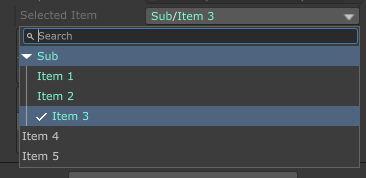
It can work with Button/ShowInInspcetor function parameters
using SainsField;
using SainsField.Playa;

[ShowInInspector]
[Dropdown(nameof(GetItems))]  // change the returned value display
private string SelectItemWithButton([Dropdown(nameof(GetItems))] string item)
{
    return item;
}

[Button]
[Dropdown(nameof(GetItems))]  // change the returned value display
private string SelectItemWithButton([Dropdown(nameof(GetItems))] string item)
{
    return item;
}