MenuDropdownA dropdown selector. Supports reference type, sub-menu, separator, and disabled select item.
If you want a searchable dropdown, see AdvancedDropdown.
-
string funcName=nullcallback function. Must return aMenuDropdown<T>. When using on anenum, you can omit this parameter, and the dropdown will use the enum values as the dropdown items. -
bool slashAsSub=truetreat/as a sub item.Note: In
IMGUI, this just replace/to Unicode\u2215Division Slash ∕, and WILL have a little bit of overlap with nearby characters. -
EUnique unique=EUnique.None: When using on a list/array, a duplicated option can be removed ifEnique.Remove, or disabled ifEUnique.Disable. No use for non-list/array. -
AllowMultiple: No
If you're using UI Toolkit, the search box can also search the path too (rather than just the value).
Example
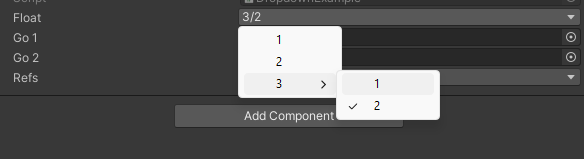
using SaintsField; [MenuDropdown(nameof(GetDropdownItems))] public float _float; public GameObject _go1; public GameObject _go2; [MenuDropdown(nameof(GetDropdownRefs))] public GameObject _refs; private MenuDropdown<float> GetDropdownItems() { return new MenuDropdown<float> { { "1", 1.0f }, { "2", 2.0f }, { "3/1", 3.1f }, { "3/2", 3.2f }, }; } private MenuDropdown<GameObject> GetDropdownRefs => new MenuDropdown<GameObject> { {_go1.name, _go1}, {_go2.name, _go2}, {"NULL", null}, };
To control the separator and disabled item
using SaintsField;

[MenuDropdown(nameof(GetDropdownItems))]
public Color color;

private MenuDropdown<Color> GetDropdownItems()
{
    return new MenuDropdown<Color>
    {
        { "Black", Color.black },
        { "White", Color.white },
        MenuDropdown<Color>.Separator(),
        { "Basic/Red", Color.red, true },  // the third arg means it's disabled
        { "Basic/Green", Color.green },
        { "Basic/Blue", Color.blue },
        MenuDropdown<Color>.Separator("Basic/"),
        { "Basic/Magenta", Color.magenta },
        { "Basic/Cyan", Color.cyan },
    };
}
And you can always manually add it:
MenuDropdown<Color> dropdownList = new MenuDropdown<Color>();
dropdownList.Add("Black", Color.black);  // add an item
dropdownList.Add("White", Color.white, true);  // and a disabled item
dropdownList.AddSeparator();  // add a separator
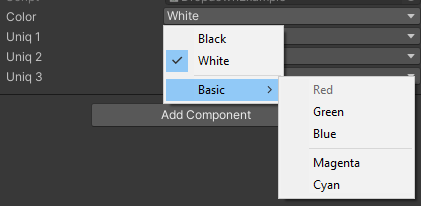
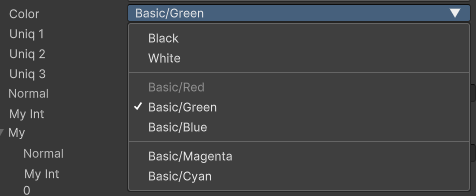
The look in the UI Toolkit with slashAsSub: false:
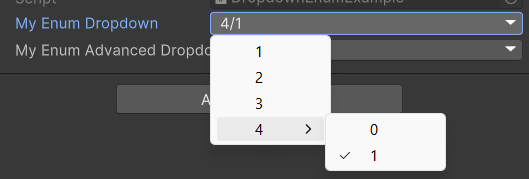
Finally, using it on an enum to select one enum without needing to specify the callback function.
If you add RichLabel to the enum, the item name will be changed to the RichLabel content.
[Serializable]
public enum MyEnum
{
    [InspectorName("1")]  // InspectorName is optional. Just for you to have more fancy control
    First,
    [InspectorName("2")]
    Second,
    [InspectorName("3")]
    Third,
    [InspectorName("4/0")]
    ForthZero,
    [InspectorName("4/1")]
    ForthOne,
}

[MenuDropdown] public MyEnum myEnumDropdown;