OnEventImportantEnableSaintsEditorbefore using
This is a method decorator, which will bind this method to the target UnityEvent (allows generic type) invoke event.
Parameters:
string eventTargetthe targetUnityEvent. If you have dot in it, it will first find the field (or property/function), then find the target event on the found field using the name after the dot(s) recursively.object value=nullthe value passed to the method. Note unity only supportbool,int,float,stringandUnityEngine.Object. To pass aUnityEngine.Object, use a string name of the target, and set theisCallbackparameter totruebool isCallback=false: whenvalueis a string, set this totrueto obtain the actual value from a method/property/field
Example:
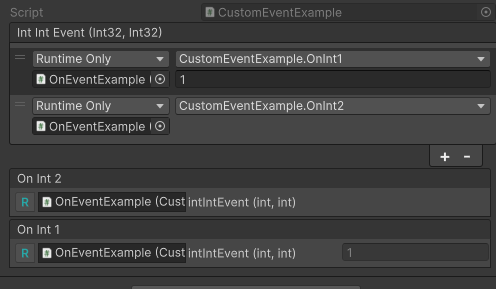
public UnityEvent<int, int> intIntEvent; [OnEvent(nameof(intIntEvent))] public void OnInt2(int int1, int int2) // dynamic parameter binding { } [OnEvent(nameof(intIntEvent), value: 1)] public void OnInt1(int int1) // static parameter binding { }
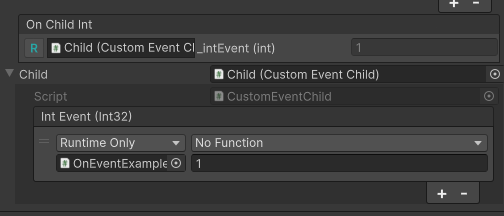
Example of using dot(s):
// CustomEventChild.cs
public class CustomEventChild : MonoBehaviour
{
    [field: SerializeField] private UnityEvent<int> _intEvent;
}

// CustomEventExample.cs
public class CustomEventExample : MonoBehaviour
{
    // it will find the `_intEvent` on the `_child` field
    [OnEvent(nameof(_child) + "._intEvent")]
    public void OnChildInt(int int1)
    {
    }

    [Expandable]
    public CustomEventChild _child;
}