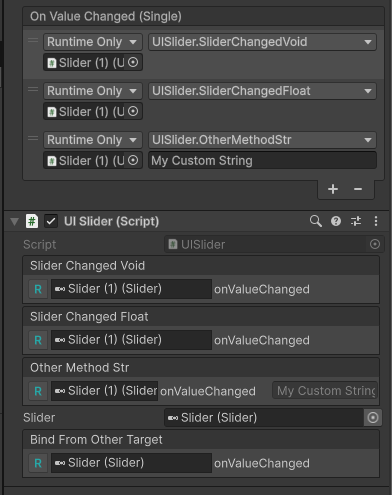
OnSliderChangedImportantEnableSaintsEditorbefore using
This is a method decorator, which will bind this method to the target Slider's onValueChanged<float> event.
Parameters:
string buttonTarget=nullthe target button.nullto get it form the current target.object value=nullthe value passed to the method. Note unity only supportbool,int,float,stringandUnityEngine.Object. To pass aUnityEngine.Object, use a string name of the target, and set theisCallbackparameter totruebool isCallback=false: whenvalueis a string, set this totrueto obtain the actual value from a method/property/field
// Please ensure you already have SaintsEditor enabled in your project before trying this example using SaintsField; [OnSliderChanged] // bind a void public void SliderChangedVoid() { } [OnSliderChanged] // bind to receive the value public void SliderChangedFloat(float value) { } [OnSliderChanged(value: "My Custom String")] // bind with a static value callback public void OtherMethodStr(string str) { } [GetInSiblings] public Slider slider; public Slider GetMySlider() => slider; [OnSliderChanged(nameof(GetMySlider))] // taget is a callback (support field/property/function) public void BindFromOtherTarget(float s) { }
It'll display a UI that where the event is binded