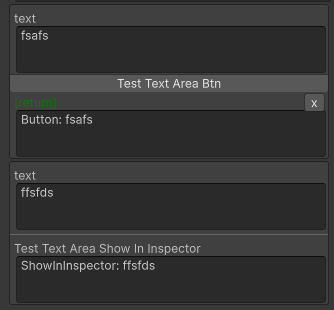
ResizableTextAreaThis TextArea will always grow its height to fit the content. (minimal height is 3 rows).
Note: Unlike NaughtyAttributes, this does not have a text-wrap issue.
Parameters:
bool inline=false: true to use a normal field style that the label & input in the same lineint minRow=0: >1 to set the minimal row height
Allow Multiple: No
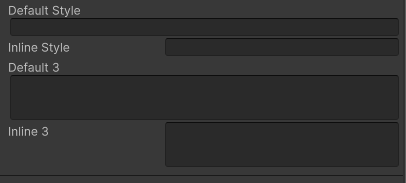
Example style:
using SaintsField; [ResizableTextArea] public string defaultStyle; [ResizableTextArea(inline: true)] public string inlineStyle; [ResizableTextArea(minRow: 3)] public string default3; [ResizableTextArea(inline: true, minRow: 3)] public string inline3;
using SaintsField;

[SerializeField, ResizableTextArea] private string _short;
[SerializeField, ResizableTextArea] private string _long;
[SerializeField, LabelText(null), ResizableTextArea] private string _noLabel;
It works with ShowInInspector
[ShowInInspector, ResizableTextArea]
public string RawTa
{
    get => ta;
    set => ta = value;
}

It can work with ShowInInspector
[ShowInInspector, ResizableTextArea]
private string TextArea
{
    get => _textArea;
    set => _textArea = value;
}

It can work with ShowInInspector/Button parameters and return value
[Button, ResizableTextArea]
private string TestTextAreaBtn([ResizableTextArea] string text)
{
    return "Button: " + text;
}

[ShowInInspector, ResizableTextArea]
private string TestTextAreaShowInInspector([ResizableTextArea] string text)
{
    return "ShowInInspector: " + text;
}