ValueButtonsLike tree dropdown, but this will list all options as buttons
Parameters:
-
string funcName=nullcallback function. Must return aDropdown<T>, aIEnumerable<object>(list/array etc.), aTask<Dropdown<T>>, aUniTask<Dropdown<T>>, or aIEnumeratorthat yieldDropdown<T>at last.When using on an
enum, you can omit this parameter, and the dropdown will use the enum values as the dropdown items.When using on a
bool, you can omit thiss parameter, and aTrue, aFalsebutton will show.When returning a task/ienumerator type, it'll wait the task then show the buttons.
-
EUnique unique=EUnique.None: When using on a list/array, a duplicated option can be removed ifEnique.Remove, or disabled ifEUnique.Disable. No use for non-list/array. -
bool noFold=false: whenTrue, always expand the buttons -
EObsolete obsolete=EObsolete.Remove: when using on an enum, controls how values marked with[Obsolete]are displayed:EObsolete.Remove: hide obsolete valuesEObsolete.Disable: show obsolete values as disabled buttonsEObsolete.Include: show obsolete values as selectable buttons
-
Allow Multiple: No
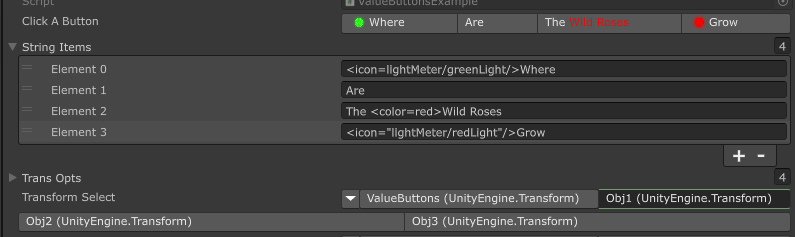
Use property/field/function as options
using SaintsField; public List<string> stringItems; [ValueButtons(nameof(stringItems))] public string clickAButton; [GetComponentInChildren] public Transform[] transOpts; [ValueButtons(nameof(transOpts))] public Transform transformSelect; // This will use the object's `.ToString()` as button label // Use a function (list, array, etc.) private IEnumerable<Transform> GetTransOpts() => transOpts; // list, array, anything that is IEnumerable [ValueButtons(nameof(GetTransOpts))] public Transform transformCallback;
You can also control the enable/disable using callback
using SaintsField;

// Use OptionList for a bit more control
private OptionList<Transform> GetTransAdvanced()
{
    OptionList<Transform> result = new OptionList<Transform>
    {
        {transOpts[0].name, transOpts[0]},  // inline add
    };

    // direct add
    result.Add(transOpts[1].name, transOpts[1], true);  // true means disabled
    // rich tags are supported
    result.Add(quot;<color={EColor.Aquamarine}><icon=star.png/> {transOpts[1].name}", transOpts[2]);
    result.Add(transOpts[3].name, transOpts[3]);
    return result;
}
[ValueButtons(nameof(GetTransAdvanced))] public Transform transformAdvanced;

Using on an enum to pick one value
Note: this does not allow bitwise/flags select. It only select one value. For Flags, please check EnumToggleButtons
using SaintsField;

// Use on enum
[Serializable]
public enum EnumOpt
{
    First,
    Second,
    Third,
    [InspectorName("<color=lime><label/>")]  // change name is supported
    Forth,
}
[ValueButtons] public EnumOpt myEnum;

Obsolete enum values are removed by default. Use EObsolete.Disable or EObsolete.Include to keep them visible:
[Serializable]
public enum EnumWithObsolete
{
    Default,
    [Obsolete("Use Default instead")]
    Legacy,
}

[ValueButtons] public EnumWithObsolete withoutObsolete;
[ValueButtons(EObsolete.Disable)] public EnumWithObsolete disabledObsolete;
[ValueButtons(EObsolete.Include)] public EnumWithObsolete includedObsolete;

Using on a bool to toggle True/False
using SaintsField;

// Use on bool
[ValueButtons] public bool myBool;

Using on a type without callback to get all the static/const values
using SaintsField;

// Use to get const/static from type
[ValueButtons] public Color unityColors;

If your target need some time to load, Task<Dropdown<T>>/UniTask<Dropdown<T>>/ienumerator is supported:
using SaintsField;

[ValueButtons(nameof(GetTransAdvanced), noFold: true)] public int transformAdvanced;

private async Task<Dropdown<int>> GetTransAdvanced()
{
    await Task.Delay(500);

    Dropdown<int> list = new Dropdown<int>();
    for (int number = 0; number < 10; number++)
    {
        list.Add(quot;{number}", number);
    }

    return list;  // for ienumerator, use `yield return Dropdown<T>` here;
}
It'll show nothing until the task/ienumerator is finished
This can works with ShowInInspector
[ShowInInspector, ValueButtons(nameof(stringItems))]
public string ShowClickAButton
{
    get => clickAButton;
    set => clickAButton = value;
}
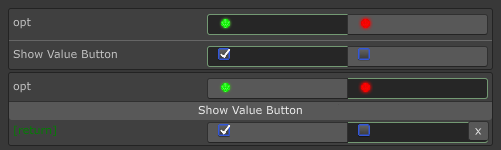
It works with ShowInInspector/Button parameters & return value
[ShowInInspector]
[ValueButtons(nameof(ValueButtonsResultProvider))]
private int ShowValueButton([ValueButtons(nameof(ValueButtonsOptionProvider))] int opt) => opt;

[Button]
[ValueButtons(nameof(ValueButtonsResultProvider))]
private int ShowValueButton([ValueButtons(nameof(ValueButtonsOptionProvider))] int opt) => opt;

private Dropdown<int> ValueButtonsOptionProvider() => new Dropdown<int>
{
    { "<icon=lightMeter/greenLight/>", 2 },
    { "<icon=lightMeter/redLight/>", 4 },
};

private Dropdown<int> ValueButtonsResultProvider() => new Dropdown<int>
{
    { "<icon=toggle on focus@2x/>", 2 },
    { "<icon=toggle focus@2x/>", 4 },
};