MinMaxSliderA range slider for Vector2 or Vector2Int
For each argument:
-
int|float minorstring minCallback: the minimum value of the slider, or a property/callback name. -
int|float maxorstring maxCallback: the maximum value of the slider, or a property/callback name. -
int|float step=1|-1f: the step of the slider,<= 0means no limit. By default, int type use1and float type use-1f -
Allow Multiple: No
a full-featured example:
using SaintsField; [MinMaxSlider(-1f, 3f, 0.3f)] public Vector2 vector2Step03; [MinMaxSlider(0, 20, 3)] public Vector2Int vector2IntStep3; [MinMaxSlider(-1f, 3f)] public Vector2 vector2Free; [MinMaxSlider(0, 20)] public Vector2Int vector2IntFree; [field: SerializeField, MinMaxSlider(-100f, 100f)] public Vector2 OuterRange { get; private set; } [SerializeField, MinMaxSlider(nameof(GetOuterMin), nameof(GetOuterMax), 1)] public Vector2Int _innerRange; private float GetOuterMin() => OuterRange.x; private float GetOuterMax() => OuterRange.y; [field: SerializeField] public float DynamicMin { get; private set; } [field: SerializeField] public float DynamicMax { get; private set; } [SerializeField, MinMaxSlider(nameof(DynamicMin), nameof(DynamicMax))] private Vector2 _propRange; [SerializeField, MinMaxSlider(nameof(DynamicMin), 100f)] private Vector2 _propLeftRange; [SerializeField, MinMaxSlider(-100f, nameof(DynamicMax))] private Vector2 _propRightRange;
Adapt
MinMaxSlider supports Adapt, allowing its values to be displayed in a different unit while remaining serialized in the base unit. The slider bounds and step are specified in the base unit.
// Values and slider settings use ratios; the inspector displays percentages.
[MinMaxSlider(0f, 1f, 0.05f), Adapt(EUnit.Ratio, EUnit.Percent), BelowText("quot; + nameof(normalizedWindow))]
public Vector2 normalizedWindow = new Vector2(0.25f, 0.75f);
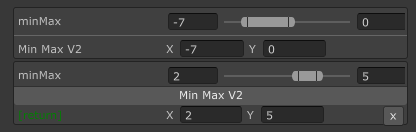
MinMaxSlider can work with ShowInInspector
[ShowInInspector, MinMaxSlider(-1f, 3f, 0.3f)]
private Vector2 ShowVector2Step03
{
    get => vector2Step03;
    set => vector2Step03 = value;
}

MinMaxSlider can work with ShowInInspector/Button parameters and return value
[ShowInInspector]
private Vector2Int MinMaxV2([MinMaxSlider(-10, 10)] Vector2Int minMax) => minMax;

[ShowInInspector]
private Vector2Int MinMaxV2([MinMaxSlider(-10, 10)] Vector2Int minMax) => minMax;