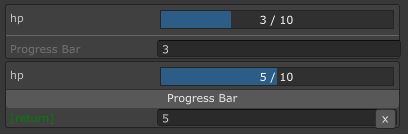
ProgressBarA progress bar for float or int field. This behaves like a slider but more fancy.
Note: Unlike NaughtyAttributes (which is read-only), this is interactable.
Parameters:
-
(Optional)
float minValue=0|string minCallback=null: minimum value of the slider -
float maxValue=100|string maxCallback=null: maximum value of the slider -
float step=-1: the growth step of the slider,<= 0means no limit. -
EColor color=EColor.OceanicSlate: filler color -
EColor backgroundColor=EColor.CharcoalGray: background color -
string colorCallback=null: a callback or property name for the filler color. The function must return aEColor,Color, a name ofEColor/Color, or a hex color string (starts with#). This will overridecolorparameter. -
string backgroundColorCallback=null: a callback or property name for the background color. -
string titleCallback=null: a callback for displaying the title. The function signature is:string TitleCallback(float curValue, float min, float max, string label);rich text is not supported here
using SaintsField;

[ProgressBar(10)] public int myHp;
// control step for float rather than free value
[ProgressBar(0, 100f, step: 0.05f, color: EColor.Blue)] public float myMp;

[Space]
public int minValue;
public int maxValue;

[ProgressBar(nameof(minValue)
        , nameof(maxValue)  // dynamic min/max
        , step: 0.05f
        , backgroundColorCallback: nameof(BackgroundColor)  // dynamic background color
        , colorCallback: nameof(FillColor)  // dynamic fill color
        , titleCallback: nameof(Title)  // dynamic title, does not support rich label
    ),
]
[NoLabel]  // make this full width
public float fValue;

private EColor BackgroundColor() => fValue <= 0? EColor.Brown: EColor.CharcoalGray;

private Color FillColor() => Color.Lerp(Color.yellow, EColor.Green.GetColor(), Mathf.Pow(Mathf.InverseLerp(minValue, maxValue, fValue), 2));

private string Title(float curValue, float min, float max, string label) => curValue < 0 ? quot;[{label}] Game Over: {curValue}" : quot;[{label}] {curValue / max:P}";
ProgressBar can work with ShowInInspector
[ShowInInspector, ProgressBar(0, 10)]
public int ShowMyHp
{
    get => myHp;
    set => myHp = value;
}

ProgressBar can work with ShowInInspector/Button parameters and return value
[ShowInInspector]
private int ProgressBar([ProgressBar(0, 10)] int hp) => hp;

[Button]
private int ProgressBar([ProgressBar(0, 10)] int hp) => hp;