PropRangeVery like Unity's Range but allow you to dynamically change the range, plus allow to set range step.
Supports int, uint, short, ushort, byte, sbyte, long, ulong, float, double
For each argument:
string minCallbackorfloat min: the minimum value of the slider, or a property/callback name.string maxCallbackorfloat max: the maximum value of the slider, or a property/callback name.float step=-1f: the step for the range.<= 0means no limit.
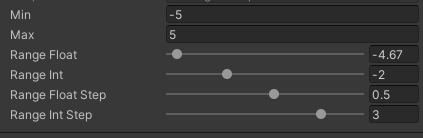
using SaintsField; public int min; public int max; [PropRange(nameof(min), nameof(max))] public float rangeFloat; [PropRange(nameof(min), nameof(max))] public int rangeInt; [PropRange(nameof(min), nameof(max), step: 0.5f)] public float rangeFloatStep; [PropRange(nameof(min), nameof(max), step: 2)] public int rangeIntStep;
Adapt
Adapt Changes the unit of how PropRange displays. For example,
[Adapt(EUnit.Ratio, EUnit.Percent)] displays percent while serializing the actual ratio.
Adapt shares the same API as Unit, except it work with number attributes.
[
    PropRange(0f, 1f, step: 0.05f),
    Adapt(EUnit.Ratio, EUnit.Percent),
    BelowText("quot; + nameof(DisplayActualValue)),
] public float stepRange;

private string DisplayActualValue(float av) => quot;<color=gray>Actual Value: {av}";
PropRange can work with ShowInInspector
[ShowInInspector, PropRange(nameof(min), nameof(max))]
public int RawPropRange
{
    get => propRange;
    set => propRange = value;
}

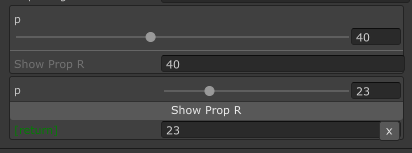
PropRange can work with ShowInInspector/Button parameters and return value
[ShowInInspector]
private int ShowPropR([PropRange(0, 100)] int p) => p;

[ShowInInspector]
private int ShowPropR([PropRange(0, 100)] int p) => p;