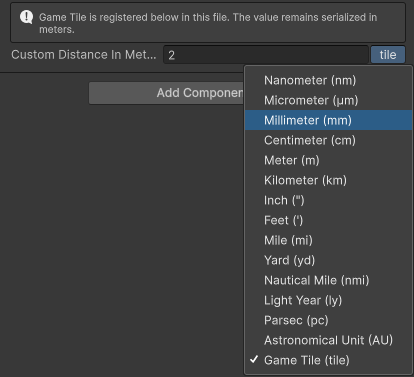
UnitUnit allows you to input numeric fields in different unit than the serialized type.
Use the unit button at the end of the field to select any registered unit in the same category.
Parameters:
EUnit|string baseUnit: The unit you want to serialized as- [Optional]
EUnit|string displayUnit: The default displaying unit.
Allow Multiple: No
using SaintsField; // saved as meter [Unit(EUnit.Meter)] public float distanceInMeters; // saved as degree, default displayed as radian [Unit(EUnit.Degree, EUnit.Radian)] public float angle;
See the EUnit.cs to know all the supported built-in types.
Custom units are supported (NOTE: THIS IS EDITOR SCRIPT!) from an Editor script.
For example, one meter is two game tiles:
using SaintsField;
#if UNITY_EDITOR
using SaintsField.Editor.Units;
using UnityEditor;
#endif

[InfoBox("Game Tile is registered below in this file. The value remains serialized in meters.")]
[Unit(EUnit.Meter, "Game Tile")]
public float customDistanceInMeters = 1f;

#if UNITY_EDITOR && SAINTSFIELD_DEBUG
[InitializeOnLoadMethod]
public static void Register()
{
    if (!UnitRegistry.GetUnitInfo("Game Tile").found)
    {
        UnitRegistry.AddCustomUnit(
            "Game Tile",  // name
            new[] { "tile" },  // symbols
            EUnitCategory.Distance,  // category, see https://github.com/TylerTemp/SaintsField/blob/master/Runtime/EUnitCategory.cs
            2m  // multiplier: how the base unit convert to this
        );
    }
}
#endif