ArraySizeA decorator that limit the size of the array or list.
Note: Because of the limitation of PropertyDrawer:
- Delete an element will first be deleted, then the array will duplicate the last element.
- UI Toolkit: you might see the UI flicked when you remove an element.
Enable SaintsEditor if possible, otherwise:
- When the field is 0 length, it'll not be filled to target size.
- You can always change it to 0 size.
If you have SaintsEditor enabled, recommend to use it together with ListDrawerSettings, the + & - will be enabled/disabled accordingly.
Parameters:
int sizethe size of the array or listint minmin value of the sizeint maxmax value of the sizestring groupBy = ""for error message grouping
Parameters overload:
-
string callback: a callback or property for the size.If the value is an integer, the size is fixed to this value.
If the value is a
(int, int)tuple, aVector2/Vector2Int, the size will be limited to the range. If any value in the range is< 0, then the side is not limited. For example,(1, -1)means the size is at least 1.(-1, 20)means the max size is 20.If the value is a
Vector3/Vector3Int, then thex,yvalue will be used as the limitIf the min
>= 0and the max< min, the max value will be ignored -
string groupBy = ""for error message grouping -
Allow Multiple: Yes
For example:
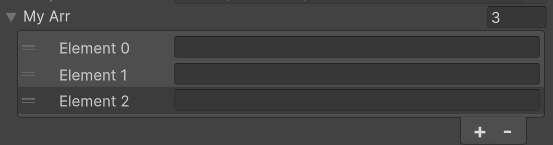
[ArraySize(3)]will make the array size fixed to 3[ArraySize(1, 5)]will make the array size range to 1-5 (both included)[ArraySize(min: 1)]will make the array size at least 1 (no max value specific). Useful to require a non-empty array.
using SaintsField; [ArraySize(3)] public string[] myArr;
using SaintsField;
using SaintsField.Playa;

[MinValue(1), Range(1, 10)] public int intValue;
[ArraySize(nameof(intValue)), ListDrawerSettings] public string[] dynamic1;

[Space]
public Vector2Int v2Value;
[ArraySize(nameof(v2Value)), ListDrawerSettings] public string[] dynamic2;