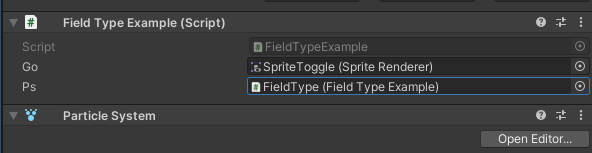
FieldTypeAsk the inspector to display another type of field rather than the field's original type.
This is useful when you want to have a GameObject prefab, but you want this target prefab to have a specific component (e.g. your own MonoScript, or a ParticalSystem). By using this you force the inspector to assign the required object that has your expected component but still gives you the original typed value to field.
This can also be used when you just want a type reference to a prefab, but Unity does not allow you to pick a prefab because "performance consideration".
Overload:
FieldTypeAttribute(Type compType, EPick editorPick = EPick.Assets | EPick.Scene, bool customPicker = true)FieldTypeAttribute(Type compType, bool customPicker)FieldTypeAttribute(EPick editorPick = EPick.Assets | EPick.Scene, bool customPicker = true)
For each argument:
-
Type compTypethe type of the component you want to pick.nullfor using current type -
EPick editorPickwhere you want to pick the component. Options are:EPick.Assetsfor assetsEPick.Scenefor scene objects
For the default Unity picker: if no
EPick.Sceneis set, will not show the scene objects. However, omitAssetswill still show the assets. This limitation is from Unity's API.The custom picker does NOT have this limitation.
-
customPickershow an extra button to use a custom picker. Disable this if you have serious performance issue. -
AllowMultiple: No
using SaintsField; [SerializeField, FieldType(typeof(SpriteRenderer))] private GameObject _go; [SerializeField, FieldType(typeof(FieldTypeExample))] private ParticleSystem _ps; // this allows you to pick a perfab with field component on, which Unity will only give an empty picker. [FieldType(EPick.Assets)] public Dummy dummyPrefab;