ReadOnly/DisableIf/EnableIfImportantEnableSaintsEditorbefore using
A tool to set field enable/disable status. Supports callbacks (function/field/property) and enum types. by using multiple arguments and decorators, you can make logic operation with it.
ReadOnly equals DisableIf, EnableIf is the opposite of DisableIf
Arguments:
For callback (functions, fields, properties):
-
(Optional)
EMode editorModeCondition: if it should be in edit mode, play mode for Editor or in some prefab stage. By default, (omitting this parameter) it does not check the mode at all.
See
Misc-EModefor more information. -
object by...callbacks or attributes for the condition. For more information, see
Callbacksection -
AllowMultiple: Yes
For ReadOnly/DisableIf: The field will be disabled if ALL condition is true (and operation)
For EnableIf: The field will be enabled if ANY condition is true (or operation)
For multiple attributes: The field will be disabled if ANY condition is true (or operation)
Logic example:
EnableIf(A)==DisableIf(!A)EnableIf(A, B)==EnableIf(A || B)==DisableIf(!(A || B))==DisableIf(!A && !B)[EnableIf(A), EnableIf(B)]==[DisableIf(!A), DisableIf(!B)]==DisableIf(!A || !B)
A simple example:
using SaintsField; [ReadOnly(nameof(ShouldBeDisabled))] public string disableMe; private bool ShouldBeDisabled() // change the logic here { return true; } // This also works on static/const callbacks using `$:` [DisableIf("$:" + nameof(Util) + "." + nameof(Util._shouldDisable))] public int disableThis; // you can put this under another file like `Util.cs` public static class Util { public static bool _shouldDisable; }
It also supports enum types. The syntax is like this:
using SaintsField;

[Serializable]
public enum EnumToggle
{
    Off,
    On,
}
public EnumToggle enum1;
[ReadOnly(nameof(enum1), EnumToggle.On)] public string enumReadOnly;
A more complex example:
using SaintsField;

[Serializable]
public enum EnumToggle
{
    Off,
    On,
}

public EnumToggle enum1;
public EnumToggle enum2;
public bool bool1;
public bool bool2() {
    return true;
}

// example of checking two normal callbacks and two enum callbacks
[EnableIf(nameof(bool1), nameof(bool2), nameof(enum1), EnumToggle.On, nameof(enum2), EnumToggle.On)] public string bool12AndEnum12;
A more complex example about logic operation:
using SaintsField;

[ReadOnly] public string directlyReadOnly;

[SerializeField] private bool _bool1;
[SerializeField] private bool _bool2;
[SerializeField] private bool _bool3;
[SerializeField] private bool _bool4;

[SerializeField]
[ReadOnly(nameof(_bool1))]
[ReadOnly(nameof(_bool2))]
[LabelText("readonly=1||2")]
private string _ro1and2;


[SerializeField]
[ReadOnly(nameof(_bool1), nameof(_bool2))]
[LabelText("readonly=1&&2")]
private string _ro1or2;


[SerializeField]
[ReadOnly(nameof(_bool1), nameof(_bool2))]
[ReadOnly(nameof(_bool3), nameof(_bool4))]
[LabelText("readonly=(1&&2)||(3&&4)")]
private string _ro1234;
EMode example:
using SaintsField;

public bool boolVal;

[DisableIf(EMode.Edit)] public string disEditMode;
[DisableIf(EMode.Play)] public string disPlayMode;

[DisableIf(EMode.Edit, nameof(boolVal))] public string disEditAndBool;
[DisableIf(EMode.Edit), DisableIf(nameof(boolVal))] public string disEditOrBool;

[EnableIf(EMode.Edit)] public string enEditMode;
[EnableIf(EMode.Play)] public string enPlayMode;

[EnableIf(EMode.Edit, nameof(boolVal))] public string enEditOrBool;
// dis=!editor || dis=!bool => en=editor&&bool
[EnableIf(EMode.Edit), EnableIf(nameof(boolVal))] public string enEditAndBool;
It also supports sub-field, and value comparison like ==, >, <=. Read more in the "Syntax for Show/Hide/Enable/Disable/Required-If" section.
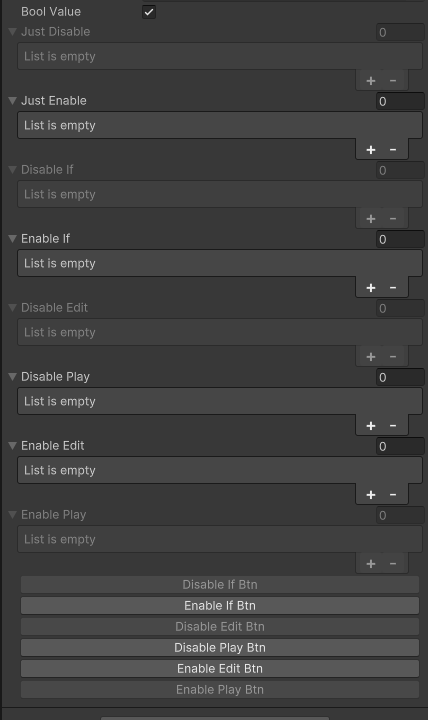
It works with ShowInInspector & Button
// Please ensure you already have SaintsEditor enabled in your project before trying this example
using SaintsField.Playa;

[DisableIf] public int[] justDisable;
[EnableIf] public int[] justEnable;

[DisableIf(nameof(boolValue))] public int[] disableIf;
[EnableIf(nameof(boolValue))] public int[] enableIf;

[DisableIf(EMode.Edit)] public int[] disableEdit;
[DisableIf(EMode.Play)] public int[] disablePlay;
[EnableIf(EMode.Edit)] public int[] enableEdit;
[EnableIf(EMode.Play)] public int[] enablePlay;

[Button, DisableIf(nameof(boolValue))] private void DisableIfBtn() => Debug.Log("DisableIfBtn");
[Button, EnableIf(nameof(boolValue))] private void EnableIfBtn() => Debug.Log("EnableIfBtn");
[Button, DisableIf(EMode.Edit)] private void DisableEditBtn() => Debug.Log("DisableEditBtn");
[Button, DisableIf(EMode.Play)] private void DisablePlayBtn() => Debug.Log("DisablePlayBtn");
[Button, EnableIf(EMode.Edit)] private void EnableEditBtn() => Debug.Log("EnableEditBtn");
[Button, EnableIf(EMode.Play)] private void EnablePlayBtn() => Debug.Log("EnablePlayBtn");