RequiredReminding a given reference type field to be required.
This will check if the field value is a truly value, which means:
ValuedTypelikestructwill always betrulybecausestructis not nullable and Unity will fill a default value for it no matter what- It works on reference type and will NOT skip Unity's life-cycle null check
- You may not want to use it on
int,float(because only0is nottruly) orbool, but it's still allowed if you insist
If you have addressable installed, using Required on addressable's AssetReference will check if the target asset is valid
If you have RequiredIf, Required will work as a config privider instead. See RequiredIf section for more information.
Parameters:
string errorMessage = nullError message. Default is{label} is requiredEMessageType messageType = EMessageType.ErrorCustom message type.- Allow Multiple: No
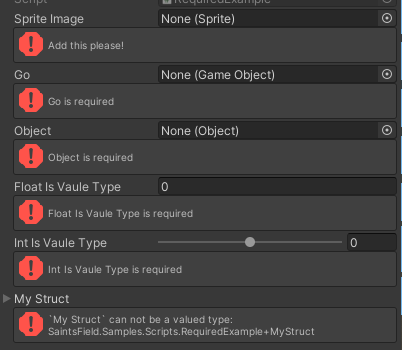
using SaintsField; [Required("Add this please!")] public Sprite _spriteImage; // works for the property field [field: SerializeField, Required] public GameObject Go { get; private set; } [Required] public UnityEngine.Object _object; [SerializeField, Required] private float _wontWork; [Serializable] public struct MyStruct { public int theInt; } [Required] public MyStruct myStruct;
[Required(messageType: EMessageType.Info)]
public GameObject empty2;
