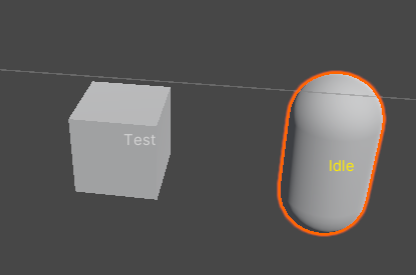
DrawLabelDraw a text in the view scene where the field object is. The decorated field need to be either a GameObject/Component or a Vector3/Vector2.
This is useful if you want to track an object's state (e.g. a character's basic states) in the scene.
Parameters:
- [Optional]
EColor eColor: color of the label. Default is white. string content = null: the label text to show. Starting with$to make it an attribute/callback.nullmeans using the field's name.string space = "this": when using on aVector3orVector2,"this"means using current object as the space container, null means world space, otherwise use the space from this callback/field value.string color = null: use a html color if this starts with#, otherwise use a callback/field value as the color.
You can also use DrawLabelShowIf/DrawLabelHideIf to control its visibility programmatically. They share the same syntax as ShowIf/HideIf.
using SaintsField; [DrawLabel("Test"), GetComponent] public GameObject thisObj; [Serializable] public enum MonsterState { Idle, Attacking, Dead, } public MonsterState monsterState; [DrawLabel(EColor.Yellow ,"quot; + nameof(monsterState))] public GameObject child;