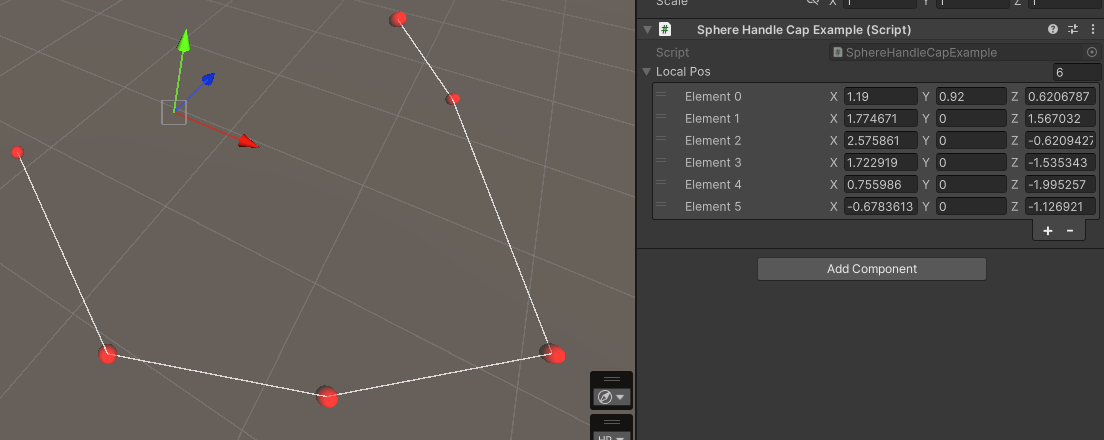
SphereHandleCapDraw a sphere in the scene like Unity's SphereHandleCap.
Parameters:
float radius = 1f: radius of the sphere. If the target field is a number, use the field's value insteadstring radiusCallback = null: use a callback or a field value as the radiusstring space = "this": the containing space of the sphere."this"means using the current target,nullmeans using the world space, otherwise means using a callback or a field valuefloat posXOffset = 0f, float posYOffset = 0f, float posZOffset = 0f:Vector3position offset for the sphere related to thespacestring posOffsetCallback = null: use a callback or a field value as the position offset. The value must be aVector3EColor eColor = EColor.White: colorfloat alpha = 1f: the alpha of the color. Not works withcolor.string color = null: the color of the line. If it starts with#, use html hex color, otherwise use as a callback. This overrides theeColor.
You can also use SphereHandleCapShowIf/SphereHandleCapHideIf to control its visibility programmatically. They share the same syntax as ShowIf/HideIf.
[DrawLine] // also draw the lines [SphereHandleCap(color: "#FF000099", radius: 0.1f)] public Vector3[] localPos; [SphereHandleCap(radius: 0.1f)] public GameObject[] objPos; // use obj's position