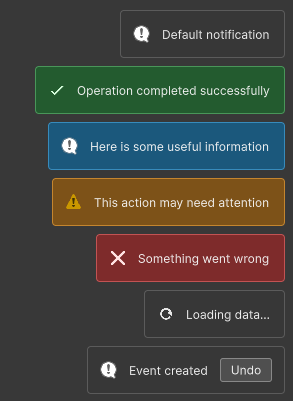
SaintsField.Editor.Toast shows a toast. API and behavior similar to mui-sonner (except the promise API)
It displays the toast at the bottom right of current window.
API
All creation methods return the created Toaster, or null when no UI Toolkit root can be found:
Toast.Show(string message, Toast.Options? options = null, VisualElement element = null)Toast.Success(string message, Toast.Options? options = null, VisualElement element = null)Toast.Info(string message, Toast.Options? options = null, VisualElement element = null)Toast.Warning(string message, Toast.Options? options = null, VisualElement element = null)Toast.Error(string message, Toast.Options? options = null, VisualElement element = null)Toast.Loading(string message, Toast.Options? options = null, VisualElement element = null)Toast.Dismiss(Toaster toaster = null, VisualElement element = null)
about Toast.Dismiss():
- toaster != null: dismiss one toast.
- element != null: dismiss all toast in window where element lives
Toast.Dismiss(): find the active window and dismiss all toasts inside
Toast.Options
string Description: secondary text rendered below the message.double? Duration: auto-close delay in milliseconds.nulluses the container default of 4000 milliseconds.double.PositiveInfinityor<=0to never auto-close.Toast.Loadingalso has no default auto-close.string Icon: a custom icon resource path. SeeLabelTextto know how the resource is foundColor? IconColor: an optional tint applied to the custom icon. The default is white.bool CloseButton: shows a close button whentrue.Toast.ActionOptions? Action: adds an action button.Action<Toaster> OnDismiss: called when the toast is dismissed explicitly.Action<Toaster> OnAutoClose: called when the duration expires.
Toast.ActionOptions
string Label: action button text.Action OnClick: callback invoked before the toast is dismissed.
Example:
using SaintsField.Editor; using SaintsField.Editor.UIToolkitElements.ToasterDrawer; using UnityEngine; Toast.Show("Default notification"); Toast.Success("Operation completed successfully"); Toast.Info("Here is some useful information"); Toast.Warning("This action may need attention"); Toast.Error("Something went wrong"); // Loading toasts remain until dismissed unless Duration is set. Toaster loading = Toast.Loading("Loading data", new Toast.Options { CloseButton = true, }); // Later: Toast.Dismiss(loading);
Config Example:
using SaintsField.Editor;
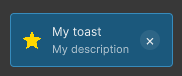
Toast.Info("My toast", new Toast.Options
{
    Description = "My description",
    Duration = double.PositiveInfinity,
    Icon = "star.png",  // or: Assets/my/pic.png
    IconColor = EColor.Gold.GetColor(),
    CloseButton = true,
});
Action and callbacks
using SaintsField.Editor;
using UnityEngine;

Toast.Show("Event created", new Toast.Options
{
    Action = new Toast.ActionOptions
    {
        Label = "Undo",
        OnClick = () => Debug.Log("Undo"),
    },
    OnDismiss = toaster => Debug.Log(quot;Dismissed {toaster.Text.text}"),
    OnAutoClose = toaster => Debug.Log(quot;Auto-closed {toaster.Text.text}"),
});
Targeting a window
Pass any VisualElement from a window to target that window explicitly. Usually, you won't need this API.
Toast.Success("Saved", element: saveButton);
The API finds the containing EditorWindow root. If element is omitted, the API uses:
EditorWindow.focusedWindow ?? EditorWindow.mouseOverWindow