Unity's Netcode for Game Objects uses a custom editor that
SaintsEditor can not be applied to.
To use ability from SaintsEditor, the most simple way is to inherent from SaintsField.Playa.SaintsNetworkBehaviour
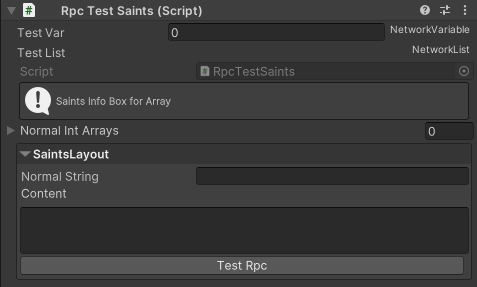
using SaintsField.Playa; using Unity.Netcode; using UnityEngine; public class RpcTestSaints : SaintsNetworkBehaviour // inherent this one { [PlayaInfoBox("Saints Info Box for Array")] // SaintsEditor specific decorator public int[] normalIntArrays; [LayoutStart("SaintsLayout", ELayout.FoldoutBox)] // SaintsEditor specific decorator public string normalString; [ResizableTextArea] public string content; public NetworkVariable<int> testVar = new NetworkVariable<int>(0); public NetworkList<bool> TestList = new NetworkList<bool>(); [Button] // SaintsEditor specific decorator private void TestRpc() { Debug.Log("Button Invoked"); } }
Result using SaintsNetworkBehaviour:
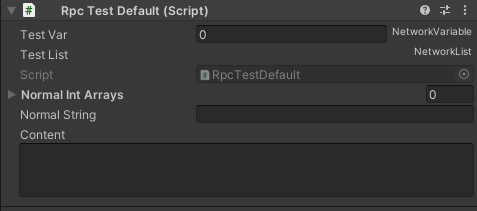
Result using default one:
The drawer is called SaintsField.Editor.Playa.NetCode.SaintsNetworkBehaviourEditor, in case if you want to apply it manually.
Please note: NetworkVariable and NetworkList will always be rendered at the top, just like Unity's default behavior. Putting it under Layout will not change this order and will have no effect.
If you do not want to inherent from SaintsNetworkBehaviour at all, please do Tools - Saints Field - Enable SaintsEditor To NetworkBehavior